
The Live Show Popup is a real-time promotion tool for your live shows. It can be embedded into your shop using an embed code and is designed to draw your visitors’ attention while a live show is ongoing.
For best results, we recommend embedding the popup across your entire shop.
Please note that the LIVEBUY SDK must be implemented on your shop for the popup to work correctly.
What Is the Live Show Popup?
-
A real-time promotional popup displayed during an ongoing live show
-
Helps increase visibility and engagement for your live streams
-
Appears automatically for visitors while you are live
-
Can be embedded on multiple shop pages using a single embed code
Popup Settings
You can configure the appearance and behavior of the live show popup in the Popup section of the settings.
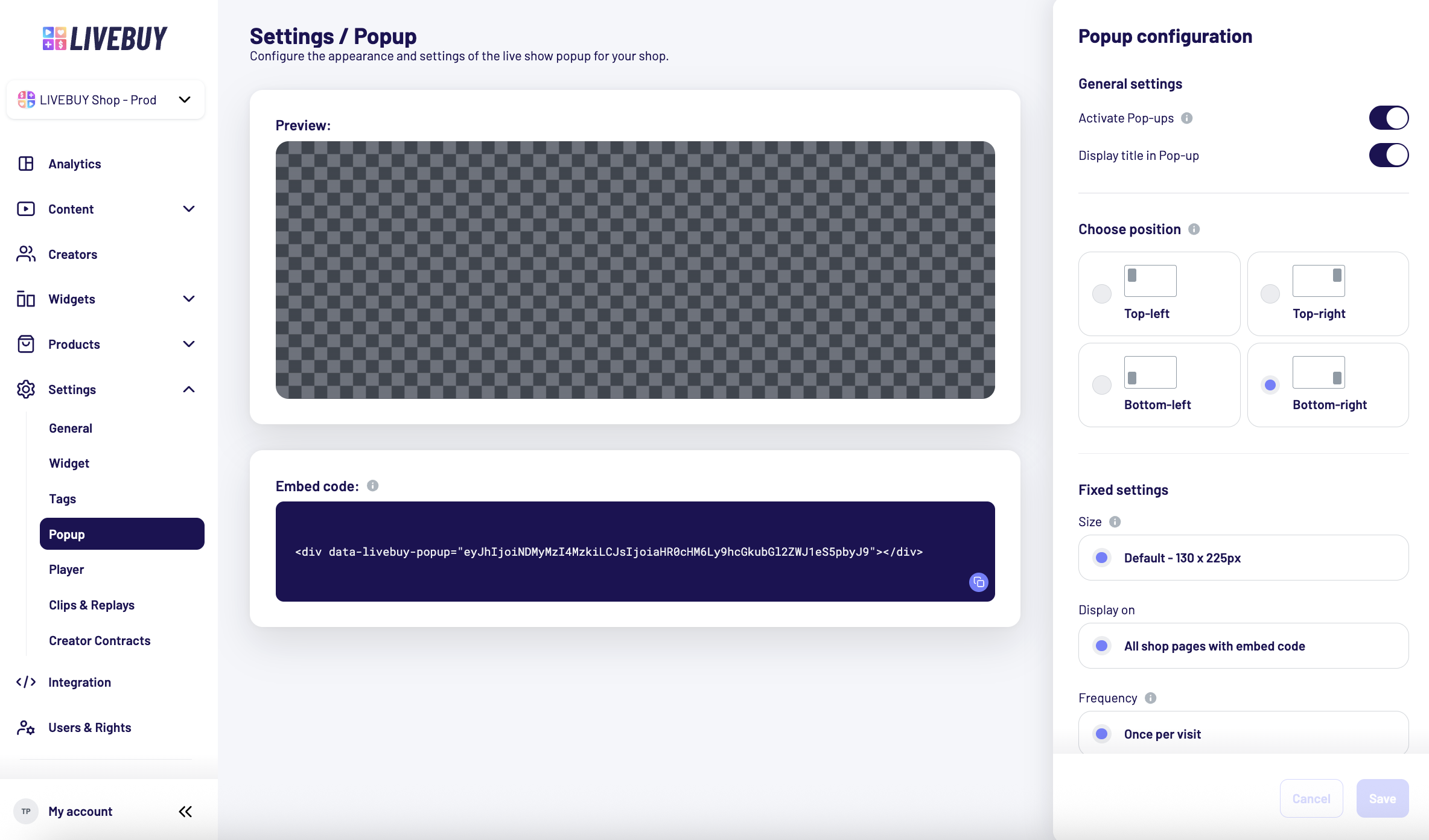
Activate or Deactivate the Popup
-
Use the activation toggle to turn the popup on or off
Note: Even when active, the live popup does not appear for shows in practice mode. Only for live shows that are streamed publicly.
Show Title in Popup
-
Use the second toggle to choose whether the live show title should be displayed in the popup
Popup Position
You can choose where the popup appears on the page:
-
Top-left
-
Top-right
-
Bottom-left
-
Bottom-right
Choose the position that best fits the layout of your shop.
Fixed Popup Settings
The following popup settings are currently fixed and cannot be changed:
-
Size: 130 × 225 px
-
Display behavior: Shown on all shop pages where the embed code is installed
-
Frequency: Displayed once per visit to avoid spamming shop visitors
Popup Preview
-
The preview is only available when you are live
-
It allows you to see:
-
How the popup looks
-
Where it appears on the page
-
Embed the Popup in Your Shop
Below the preview, you will find your shop-specific embed code.
How to Use the Embed Code
-
Copy the embed code
-
Paste it into all shop pages where the popup should be displayed
Best Practices
For maximum visibility, implement the popup globally in your shop.
Some shops choose to exclude it on checkout pages to avoid distracting their customers from checkout.
If you need help implementing the SDK or embedding the popup, please contact your Key Account Manager or support@livebuy.io