
## LIVEBUY Shoppable Video Player 2.0 ##
🎨 A whole new experience
The shoppable player has been redesigned from the ground up to streamline the add-to-cart process, provide a delightful, intuitive experience to users, as well as implement accessibility improvements for users with disabilities.
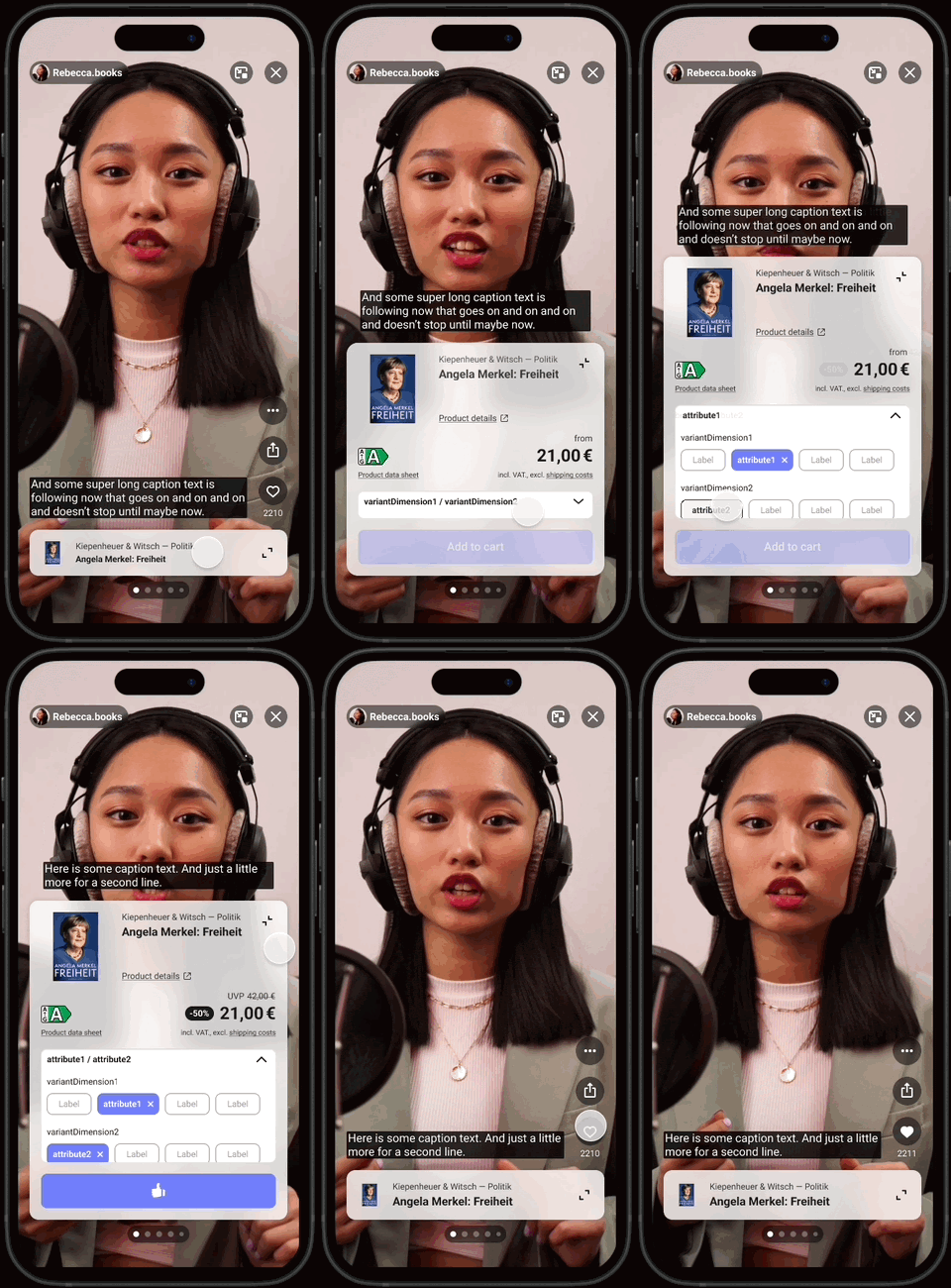
New features include:
👕 Reworked access points to open the products within the video player
In order to increase the add-to-cart rates, we made accessing shoppable products within videos more intuitive and prominent. For Clips, a full-width, swipeable product bar at the bottom of the player. For live shows & replays, a compact product stack at the bottom right. Important: Highlighting products in live shows works differently now: Even though you can still highlight up to 3 products, only the latest highlighted product will be displayed at the top of the stack.
🖼️ Product picture zoom
Viewers can now open a bigger version of the product picture by tapping / clicking on it in the expanded product carousel.
Learn more in Player Products!
❤️ Updated action buttons
Matching the layout of our all favorite social media apps, the right side of the LIVEBUY player now features quick-access buttons to like and share content, as well as a "More options" menu with additional functionality, such as
-
🪟 Hide interface: To allow users to get a clear view of the video
-
ℹ️ About this video: Information about the content to comply with the DSA (Digital services act)
-
🚩Report video (for shops that have their own report handling): Sends an event that opens the shop's DSA compliant report interface for users.
-
⌨️ Keyboard shortcuts (only on devices with keyboard): Opens an overview of all shortcuts that allow users to navigate and operate the player with their keyboard
Learn more in Likes & More Options!
⏯️ Enhanced playback controls
To remove clutter from the player interface, we have moved the playback controls into a separate panel that appears when hovering over the middle of the video (on Desktop) or tapping on the video (on mobile). We also improved the overall playback controls experience by adding preview functionality while seeking through the video, rewind and fast forward 10 seconds buttons, as well as audio track and subtitles (closed captions) selectors.
💬 Improved live chat
In live shows and replays, the live chat occupies less space now when collapsed. At the same time, users can expand the chat to enter a "chat view" that is focused on the chat interface alone with more space to read messages.
♿️ Accessibility improvements
To make the LIVEBUY shoppable player more accessible for users with disabilities, we have added various enhancements in accordance with the EU Accessibility Act, such as:
-
⌨️ Keyboard navigation: Each interaction has its own shortcut so that users can navigate the player with only their keyboard.
-
✏️ Captions for clips and replays (CC): For on-demand content (clips + replays) starting today, our system will automatically generate closed captions / subtitles from the video's audio using AI. Auto-generated captions are supported for the following languages (based on the shop's locale): bg, ca, cs, da, de, el, en, es, fi, fr, hr, it, nl, no, pl, pt, ro, ru, sk, sv, tr (please let us know if additional languages are needed and we'll try our best to add support for those as well).
-
🔴✏️ Real-time captions for live shows (CC): Also starting today, our system will automatically generate closed captions / subtitles for live shows in real time as they are streamed from the live show's audio using AI. Auto-generated real-time captions for live shows are supported for the following languages (based on the shop's locale): de, en, es, fr, it, pt. Once the live show is over, the captions will be re-created for the replay to enhance their quality (for the recreation of the captions, additional languages are supported -> see above "Captions for clips and replays").
-
🎧 Descriptive audio tracks for clips: Newly uploaded clips starting today will automatically receive an AI-generated audio track that describes what's going on in the video. This should help users with visual impairments understand the content better. AI-generated descriptive audio is currently supported for the following languages (based on the shop's locale): de, en, fr, it, nl, pl, ro (please let us know if additional languages are needed and we'll try our best to add support for those as well). Please note: Since live shows and replays typically have sufficiently descriptive audio in the original audio track, there is no additional descriptive audio track for those.
-
🌓 Increased contrast of the user interface: In order to make operating the LIVEBUY player easier for people with visual impairments, we have optimized the colors of the user interface to ensure sufficient contrast.
-
🅰️ Localized aria-attributes for interactive elements: The interactive player elements inside the shoppable video player now feature ARIA-attributes to enhance the experience for users with screen readers. The ARIA-attributes are localized in the following languages based on the user's device locale: cs, de, en, es, fr, it, nl, pl, ro, ru, tr (please let us know if additional languages are needed and we'll try our best to add support for those as well).
Learn more in the General Controls of the Player!