
Linkout products allow you to feature products, landing pages, contests, questionnaires or anything else that has a URL in your content that are not part of your imported catalogue products. These products can be shown in clips, live shows and their replays, giving you greater flexibility when planning and promoting content.
How Linkout Products Work
-
Linkout products are visible in the LIVEBUY player
-
Viewers cannot add them to the cart
-
Instead, viewers can:
-
Click “Go to product page”
-
Be redirected to the product’s URL
-
Continue watching the content in a miniplayer while browsing the product page
-
This ensures a seamless shopping experience without interrupting content consumption.
Common Use Cases
Linkout products are especially useful for:
-
Quickly adding products to a planned live show when the products are not yet available in the product catalog
-
Complex product configurations, such as:
-
Travel bookings
-
Prescription eyeglasses
(where a direct add-to-cart from the player is not possible)
-
-
Collaborations with other shops, featuring products from multiple stores in the same show and linking viewers directly to the respective product detail pages
-
E.g.: If you are partnering with a shop, you can link to their products from your content. For example: You have a fashion shop and you want to add the fitting make up to your looks → link to products from a make up store.
-
-
Linking to dedicated landing pages, such as campaign pages, product collections, or seasonal promotions, where more detailed information or curated content is available.
-
Ideal for promoting contests or giveaways by guiding users to external pages where they can learn more, participate, or submit entries, helping to increase engagement and participation.
-
Leading users to questionnaires or surveys, allowing you to collect feedback, preferences, or insights directly from your audience outside of the player experience.
-
Guiding users to store locator pages, helping them find nearby physical stores or showrooms directly from the video.
-
Useful for promoting events, live streams, webinars, or in-store events by linking to registration or event detail pages.
-
Linking to blog articles, lookbooks, or inspiration pages that provide additional context, styling ideas, or deeper product storytelling.
-
Leading users to help pages, FAQs, or customer support portals when users need more information or assistance related to the content shown.
-
In general, linkouts can be used for anything that has a URL and should be accessible directly from your video, allowing you to guide viewers to relevant external content beyond the player.
Important Notes
-
Prices are not displayed for linkout products
Prices may vary over time and will be shown only on the product page itself. -
If products require legal information (e.g. energy efficiency labels):
-
Include this information via the product image and/or
-
Manually adjust the product name to reflect the required details
-
Add a Linkout Product
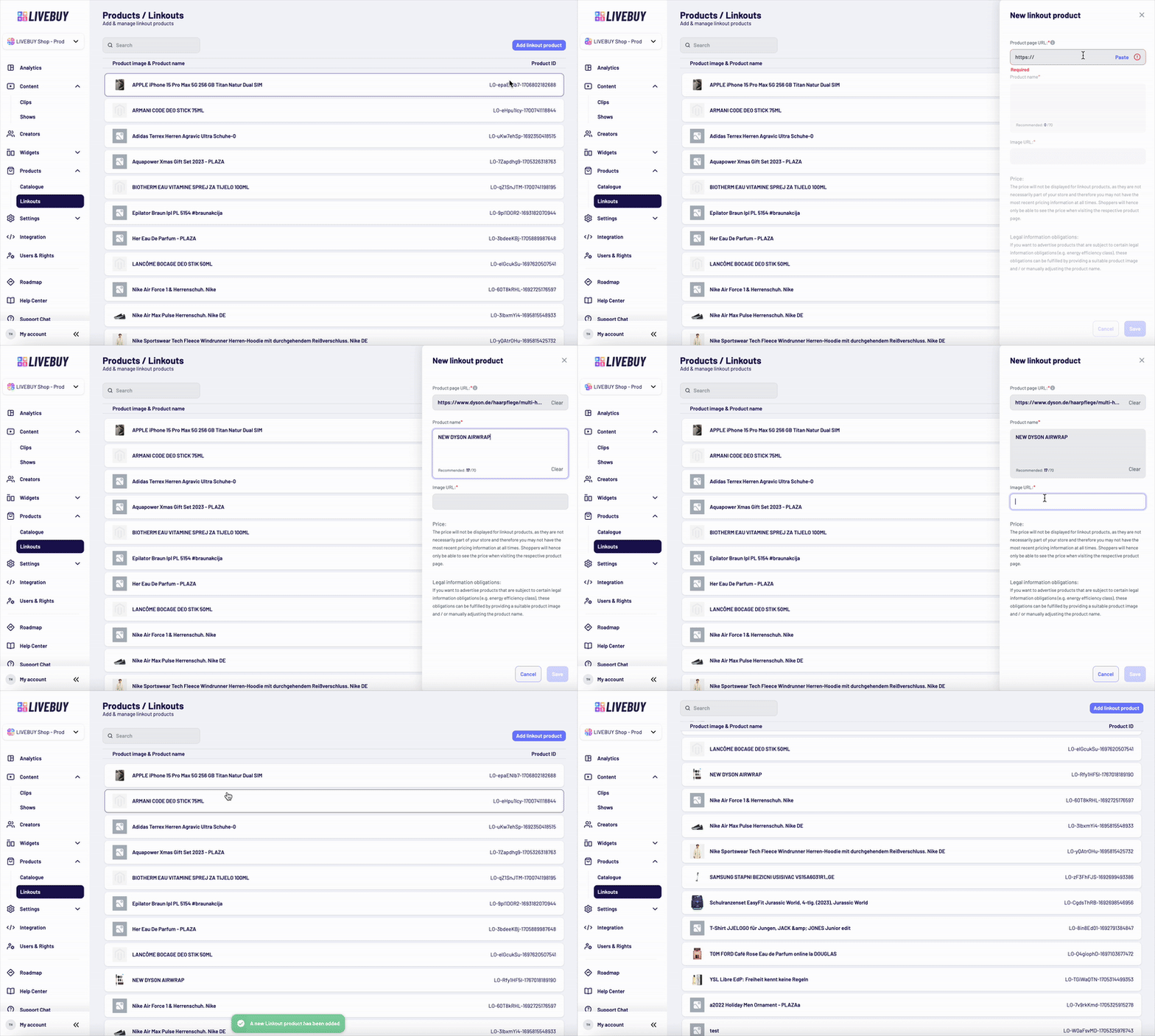
To add a new linkout product:
-
Go to LIVEBUY Dashboard → Products → Linkouts
-
You will see an overview of all existing linkout products
-
Click “Add linkout product”
-
A panel opens on the right where you can enter:
-
Product URL
-
Short description (max. 70 characters)
-
Product image URL
-
-
Click Save
The product will appear in the overview within seconds.
Edit a Linkout Product
-
Click on an existing linkout product in the overview
-
Update:
-
Product URL
-
Description
-
Image URL
-
-
Save your changes to apply them immediately
Linkout products give you maximum flexibility when showcasing products that are not part of your own product catalogue or other topics with an URL. If you have questions about using linkout products or best practices, please contact your Key Account Manager or support@livebuy.io.